



Containers: Revolutionizing Application Deployment

Luiz Scofield • July 5, 2024

Have you heard about Docker, Kubernetes, and container orchestration? Find out how they are impacting application deployment.


Surely, you’ve heard of containers before. They’re among the most talked-about technologies today. Terms like “Docker,” “Kubernetes,” and “container orchestration” frequently appear in IT discussions.


But what exactly are containers? Today, we aim to explain how application deployment has been revolutionized by this incredible and (mostly) simple-to-use technology. Here is some useful information about it.


What are containers?

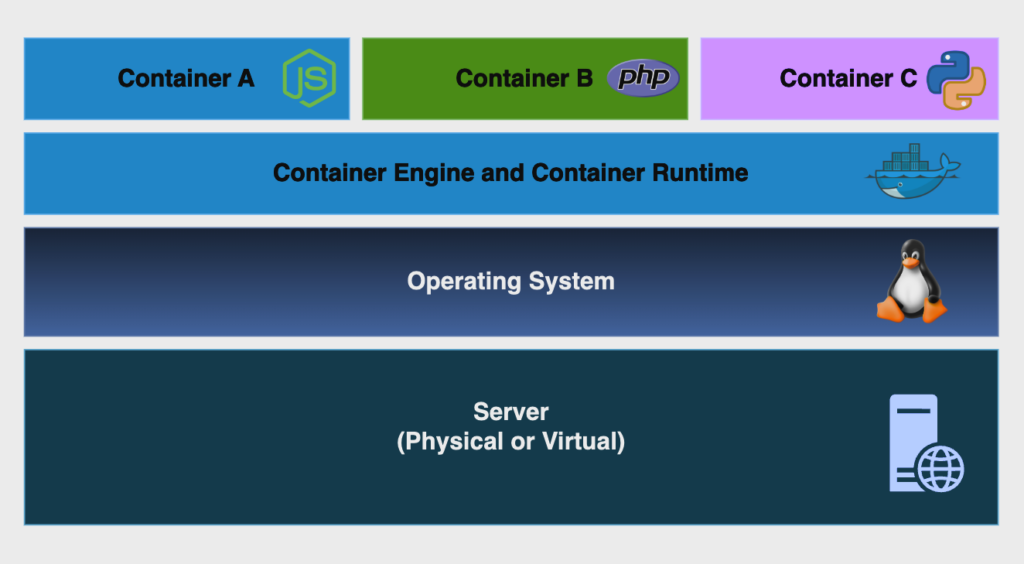
A container, simply put, is a collection of software packages needed to run a process. This might sound a bit confusing, so let’s break it down, starting with the image below.

Containers encapsulate all the necessary components to run a process, which can be a single task, a web server, a custom application, or really anything we want. They run based on a pre-built image and can be started, stopped, and recreated at any time.


The container runtime uses Linux Kernel modules to isolate processes as if they were separate from the main operating system. A container is only aware of the processes that originate from itself, but they’re actually running on the host operating system. This is made possible by using Linux namespaces, allowing multiple containers to run on the same machine because they can share the same Linux Kernel.


You can build your own container image with your application code and dependencies and push it to a repository, called a registry. From there, you can run your container almost anywhere. The only requirements are the container engine and the container runtime running on the machine. The container runtime interacts with the kernel and makes it possible to run a container, while the container engine handles user interactions and requests.


Containers have been around for quite some time, but they became popular with the rise of Docker Engine, mainly because it greatly simplifies the process of building and running containers.


How we used to make deployments without containers

To understand the benefits of using containers, we first need to look at how traditional application architecture usually works.

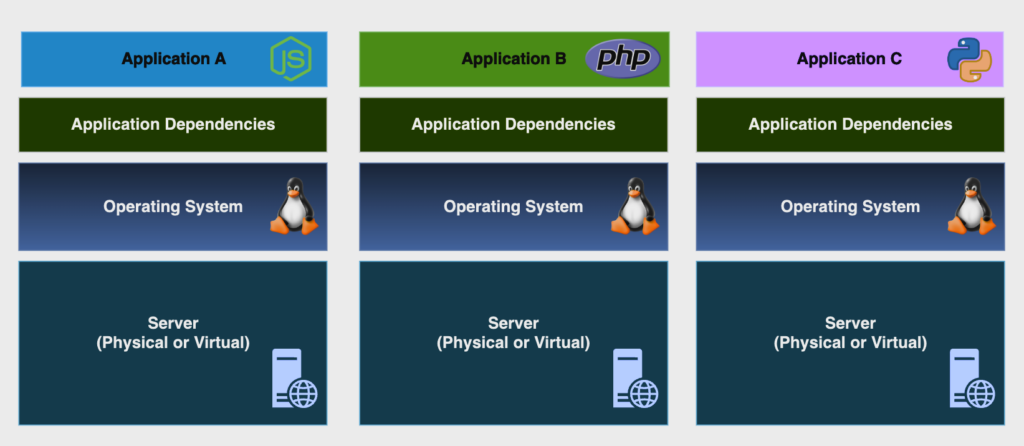
In a traditional deployment, we have a server (which can be physical or virtual) with an operating system installed on it. To deploy an application, we must first install all the application dependencies (libraries, plugins, etc.), and then we can run our application code.


The initial setup, while a bit time-consuming, is generally manageable. The real challenge arises when we need to deploy a new version of our app. This often means upgrading application packages to support the new version, and sometimes even upgrading the operating system to accommodate the latest dependencies. Assuming we don’t encounter incompatible packages and libraries (which can even break the OS), we can finally run our new code.


This whole process can take a long time and often involves some application downtime. It gets even worse if we need to roll back to a previous version, leading to more downtime. And we all know that downtime is a huge red flag for any business relying on the application for critical purposes. While high availability techniques, such as running multiple servers with the same application, can reduce downtime, they also increase costs.


From an infrastructure perspective, this model is very demanding because we basically need a whole server to run an application. Typically, we would have many virtual machines, each with its own operating system, and all of them have to go through the same deployment process described above.


The evolution of application deployment

We discussed the problems we might face when deploying a new version of our application on a legacy architecture model. But how does that process look when we are working with containers?


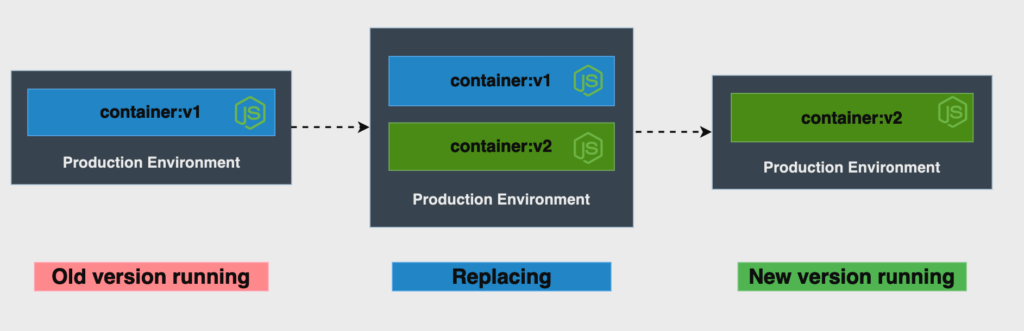
The diagram above shows a simple environment running an application in a container. Now, this application has a new version that needs to be deployed. One of the easiest ways to accomplish this task is by creating a container with the new image version and, once it’s successfully created, removing the old container version.


It’s as simple as that. There’s no need to upgrade packages on the OS or even the OS itself. This is possible because the container includes all the necessary dependencies, which don’t need to be pre-installed on the host. And if we need to roll back to the old version? Just follow the same process to create the container with the older version.


This is just a basic example of a simple container architecture. However, the flexibility and agility it offers make it possible to build complex software architectures with easily deployable services. This aligns perfectly with the DevOps culture by accelerating software development.


With containers, we can automate software deployments using Continuous Integration and Continuous Delivery (CI/CD) techniques. Since containers have straightforward deployment processes with predictable variables, we can use deployment pipelines to deliver new code to our environments automatically, reducing manual intervention to a minimum.


Containers: modularizing applications using microservices

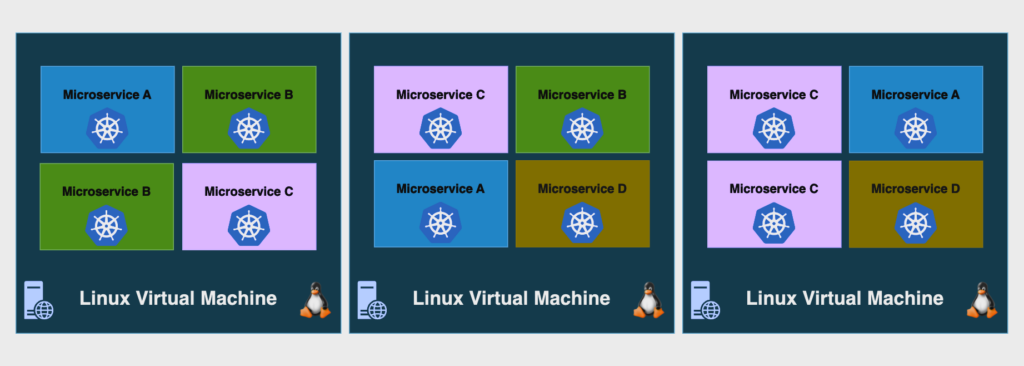
Another advantage of containers is the ability to modularize our applications using microservices. A microservice is a small, independent application that is part of a larger ecosystem. For example, we might have a microservice responsible for the product search process on a website and another one responsible for the payment process. This kind of architecture can speed up software development even more because you can deploy changes made to specific parts of the system independently, without needing to redeploy all of your microservices.

This is where container orchestration comes into play. Container orchestration automates the operational management of containerized workloads. The most famous tool for this is Kubernetes.


Kubernetes cluster consists of a set of servers responsible for running our applications. It allows us to automatically deploy our applications within the cluster without worrying about which server will run them. Kubernetes can manage the scaling of our applications across different servers, helping to achieve high availability and fault tolerance.

Container orchestration can be quite complex, and that’s why we provided this brief overview of its capabilities and benefits.


So, is using containers really that easy?

Well, no. While containers offer a lot of benefits and possibilities, they also come with their own set of challenges. Here are some points to keep in mind when working with them:


  • You need to know how to persist container storage, so you don’t lose important data.
  • It’s a good practice to have a private registry to store your images.
  • You must learn how to find and resolve vulnerabilities in container images to protect your private information and code.
  • You need to know how to handle incoming traffic to your containerized applications.
  • Container orchestration can be very challenging to learn, especially at the beginning.
  • It’s important to learn how to limit and manage infrastructure resources.
  • Scaling (both vertically and horizontally) needs careful attention during configuration.


These are just some of the topics that will be part of your daily routine when managing containerized workloads, but when everything is working together, it’s simply amazing!


Is working with containers worth it?

 Absolutely, yes! But do all workloads need to be complex, orchestrated, and with hundreds of containers? The answer is no. You can have simple deployments with small, traditional applications and still benefit from using containers. The quick process of building and deploying them can transform your development process, making it more efficient.


Containers are an incredible technology that can exponentially accelerate software development, turning time-consuming, periodic deployments into fast, automated, and frequent ones.


Luiz Scofield, IT Infrastructure Analyst

DevOps and open source enthusiast, specialized in cloud computing technologies, Linux administration, containers, and Infrastructure as Code.

LET'S CONNECT

Ready to unlock your team's potential?


e-Core

We combine global expertise with emerging technologies to help companies like yours create innovative digital products, modernize technology platforms, and improve efficiency in digital operations.


You may also be interested in:

Por Adriele Radmann 3 de agosto de 2026
Discover why customer support is your strongest shield against churn. Learn how to connect support, product dev, and AI to protect recurring revenue.
23 de julho de 2026
See how Banco Inter migrated to Jira Cloud, cut $200K in annual costs, and boosted team efficiency with e-Core as its implementation partner.

Por Flávia Batista 10 de julho de 2026
There is a belief that runs deep inside IT operations teams: a noisy environment is a healthy one. If alerts are firing constantly, if tickets are piling up, if the on-call rotation is getting hit at 2am, that means monitoring is working. The tools are catching things. I understand where this comes from. In the early days of observability, silence was genuinely suspicious. A quiet dashboard often meant a gap in coverage, a misconfigured rule, something important slipping through undetected. So teams learned to treat volume as proof, and that instinct stayed long after the environment around it changed. But noise is not proof that monitoring is working. In most cases, it is proof that something upstream was never fixed. Automation at the wrong end When alert volume becomes unsustainable, the response is almost always the same. Leadership looks at the backlog (a thousand tickets a day, engineers buried, SLAs slipping) and reaches for automation at the remediation end of the pipeline: AI agents plugged into monitoring tools, scripts that fire when incident X arrives, routing logic that moves tickets faster. These are reasonable responses to an unreasonable situation, but they treat cost rather than cause. Most of those alerts should never have been generated. Processing them faster does not change why they exist.