When embarking on a journey with cloud solutions, one of the top concerns for any organization is securing access and guarding critical data.
Using Atlassian cloud tools such as Jira, Jira Service Management, Assets, Confluence, and Compass means entrusting them with valuable company data—often sensitive and crucial for business success. Strong access management is essential to ensure that unauthorized users do not gain access to this information.
To tackle this challenge, Atlassian Guard (formerly Atlassian Access until March 2024) provides enterprise-grade security with features like single sign-on (SSO), automated user provisioning, and real-time threat monitoring.
But how exactly can you benefit from this tool? And what additional security protections does it provide?
What is Atlassian Guard, and how does it work?
When explaining Atlassian Guard and its practical application, I like to use the analogy of a gated community:
Your organization is the entire community, and your Atlassian products are the individual houses, each with its access control and keys. Atlassian Guard acts as your security gate—it verifies the identity of those entering your organization, ensures the authorized user base is always up to date, and helps prevent unauthorized access or data breaches.
Once someone enters your gated community, they can move freely within the houses they have permission to access without needing to prove their identity repeatedly.
That’s the level of security and convenience that Atlassian Guard brings to your organization.
What security features does Atlassian Guard offer?
From a technical perspective, one of Guard’s key features is its integration with Single Sign-On (SSO), which adds an extra layer of protection and identity management. Below are some ways SSO enhances your cloud security:
Centralized authentication
SSO allows users to access multiple Atlassian applications with a single set of credentials. This centralizes authentication, making access management easier and reducing the number of passwords users need to remember—lowering the risk of weak or reused passwords. Additionally, it enables authentication through company-approved identity providers, streamlining security processes.
Integration with corporate directories
Atlassian Guard integrates with corporate directories such as Active Directory and LDAP. This means that existing security policies and credentials can be utilized without the need for additional identity management systems, ensuring a consistent and secure login experience.
Enhanced password security
With SSO, password policies can be enforced more effectively. Organizations can require complex passwords, mandate periodic changes, and implement multi-factor authentication (MFA), making it significantly harder for attackers to compromise user accounts.
Reduced phishing risks
By consolidating authentication through SSO, Atlassian Guard minimizes phishing risks. Users access all their applications through a single, secure entry point, making it easier to detect and prevent phishing attempts. Additionally, centralized authentication allows for better monitoring and response to suspicious activities.
Audit and compliance
SSO integration enhances visibility into user activity. Atlassian Guard provides auditing tools that log access events, helping organizations comply with security and privacy regulations such as GDPR and HIPAA. This level of insight is crucial for detecting and mitigating security threats quickly.
→ Reduce the burden of IT maintenance with our IT Ops services
How does Atlassian Guard improve user management?
Another key security feature of Guard is automated user provisioning and synchronization. Returning to the gated community analogy, this is like managing an updated list of authorized residents and ensuring that each person has the correct level of access to specific houses (or Atlassian products). Key benefits of automated user provisioning include:
Automated User Management
Atlassian Guard streamlines the process of adding, updating, and removing users, reducing manual effort and ensuring that user data is consistently applied across all Atlassian products. This minimizes human errors associated with manual data entry, making user management more efficient and accurate.
Centralized Access Control
Guard’s centralized access control simplifies security policy enforcement. It automatically deactivates accounts that are no longer needed, reducing the risk of unauthorized access. Additionally, it maintains detailed provisioning logs for audit and compliance purposes.
Faster Onboarding
New employees gain access to the necessary tools and permissions quickly, allowing them to start working without delays. Roles and permissions can be automatically assigned based on job functions, streamlining access management.
What are the differences between Atlassian Guard Standard and Premium?
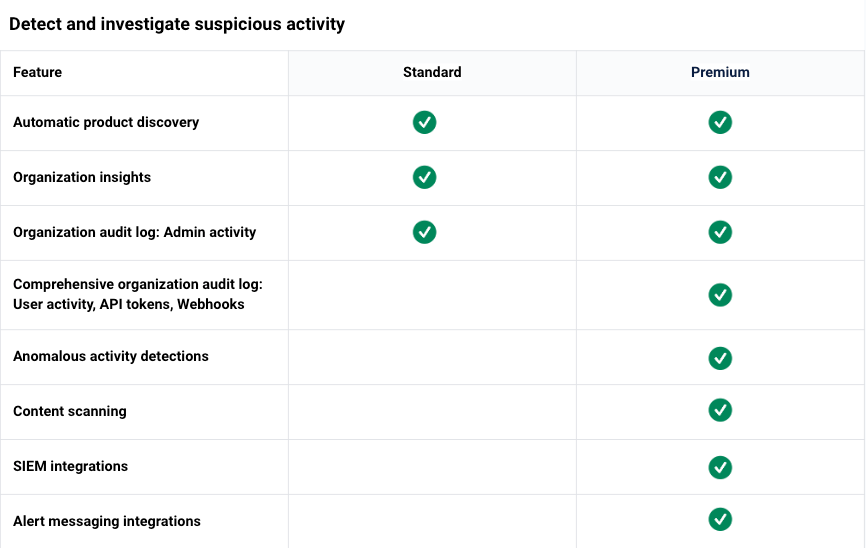
With the recent name change, Atlassian now offers two pricing plans: Standard and Premium. Both plans provide access to all the security benefits outlined above, as well as additional features such as API key management, mobile app access control, and policy enforcement.
The Premium plan includes advanced security layers, such as data classification and sensitive data monitoring, allowing organizations to respond quickly to potential threats. For example, if a user exports many Confluence pages, an alert can be triggered for the administrator to take action. Similarly, Guard can monitor for sensitive data, such as credit card numbers, passwords, Bitcoin wallet addresses, or other financial details, ensuring compliance and security.
Enterprise customers using Jira, Jira Service Management, or Confluence get Atlassian Guard Standard for free. Another key advantage for Enterprise customers is the ability to connect multiple identity providers, making access management even more adaptable to the evolving needs of your business.
Below is a comparison of the features offered in Guard Standard and Guard Premium as of March 2025 (source: Atlassian):